

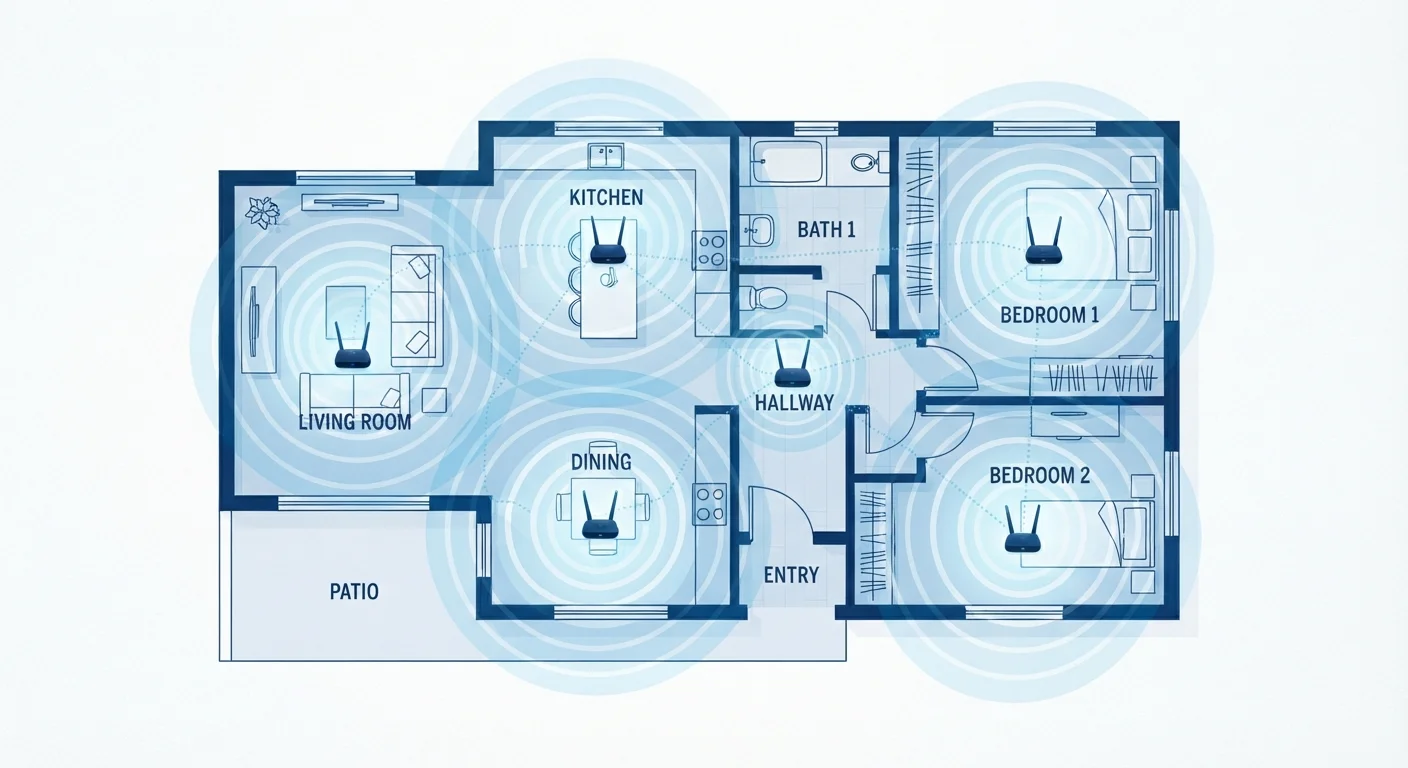
Key Takeaways
- A standard router works well in smaller homes where one broadcast point reaches every device.
- Mesh systems reduce dead zones by distributing multiple nodes across a home rather than boosting a single signal.
- Mesh nodes use the same network name, so devices roam between them without manual switching.
- A mesh system costs more upfront and adds configuration complexity compared with a single router.
- Better router placement can solve many coverage problems before you consider a mesh upgrade.
- Larger homes, multi-story layouts, and thick walls are the situations where mesh performs most clearly.
Mesh network
A mesh network is a Wi-Fi system made up of two or more hardware nodes that work together as a single network. Instead of one router broadcasting from a fixed point, each node relays the signal to the next, so coverage spreads across a larger area without dead zones. Every node shares the same network name, and your devices switch between them automatically as you move around.
Most consumer mesh systems use a dedicated wireless backhaul channel (a separate radio band used only for node-to-node communication) to avoid the speed loss that affects older range extenders.
How a standard router works
A standard router connects to your modem, receives your internet signal, and broadcasts Wi-Fi from a single location. Every device in your home connects to that one broadcast point. The router uses radio waves, which weaken with distance and degrade further when they pass through walls, floors, and large appliances.
For a one-bedroom apartment or a small single-story home, this setup works fine. Place the router centrally, and the signal reaches most corners without much trouble. The position of that single router shapes your coverage more than most people realize, and many dead zone complaints trace back to a router tucked inside a cabinet or pressed against an exterior wall.
The limitation shows in larger homes. A router placed near the modem in a front hallway may broadcast well into the living room but struggle to reach a back bedroom two walls away. The signal does not stop; it just becomes too weak for reliable, high-speed use.
What a mesh system does differently
A mesh system replaces the single broadcast point with a set of nodes, each a small hardware unit placed in different parts of the home. One node connects to the modem as the primary unit. The others communicate with it and with each other, forming a web of overlapping coverage zones.
Because all nodes share one network name and password, your phone or laptop does not treat them as separate networks. The system hands your device off from node to node as you move between rooms, without you disconnecting and reconnecting manually. This automatic handoff is what separates a mesh system from a simple range extender, which creates a second network name and requires you to switch manually.
Backhaul: the connection between nodes
The communication path between mesh nodes is called the backhaul. On systems with a dedicated backhaul radio, that inter-node traffic runs on its own channel and does not compete with the traffic flowing between nodes and your devices. Budget systems that lack a dedicated backhaul share bandwidth across both tasks, which can reduce speeds at nodes farther from the primary unit.
The communication path between nodes is called the backhaul. On systems with a dedicated backhaul radio, that inter-node traffic runs on its own channel and does not compete with the traffic flowing between nodes and your devices. Budget systems that lack a dedicated backhaul share bandwidth across both tasks, which can lower speeds at nodes farther from the primary unit.
When a mesh system makes sense
Mesh systems suit specific situations. Homes larger than roughly 2,000 square feet often see the clearest benefit, because a single router cannot broadcast reliably across that space from one fixed point. Multi-story homes gain from having a node on each floor. Homes with thick concrete, brick, or plaster walls also benefit, because those materials absorb radio signals more aggressively than standard drywall.
If you work from home and move between a home office, kitchen, and backyard, consistent coverage across all those areas matters more than it would for a household where devices stay in one room. Mesh addresses that without requiring you to manage multiple networks. For a deeper look at how wired connections compare as a complement to any wireless setup, see Wi-Fi vs. wired Ethernet.
Mesh systems cost more than a single router, typically two to four times as much for a two-node kit. That cost is justified when coverage genuinely requires it. In smaller homes, the money is often better spent on a higher-quality single router combined with careful placement.
Check placement before upgrading
Before buying a mesh system, move your existing router to the most central location your home allows, away from walls, metal objects, and enclosed cabinets. Many reported dead zones disappear with better placement alone. See the router placement guide for step-by-step principles.
Setting up and managing a mesh network
Most consumer mesh systems configure through a smartphone app rather than a browser-based admin panel. The app guides node placement, names the network, and handles firmware updates. This makes initial setup accessible, though it also means some of the granular controls available in a traditional router interface are either absent or buried. If you want to understand what those controls do, the router admin panel guide covers the key settings in plain terms.
Node placement matters in a mesh system just as router position matters with a single unit. Nodes work best when they overlap coverage zones by roughly a third rather than sitting at the extreme edge of each other's range. Placing a second node too far from the first can weaken the backhaul and reduce the benefit across the whole system.
For homes where a mesh system seems like too large an investment, powerline adapters and MoCA adapters offer an alternative by using existing electrical or coaxial wiring to extend a reliable connection to distant rooms, often at lower cost. The right solution depends on your home's layout and existing wiring.