

Our Verdict
Powerline adapters are the more universally compatible choice because they rely on electrical wiring found in every home. MoCA adapters tend to deliver better performance where coaxial cable is already in place, making them a strong fit for anyone who wants wired-level reliability without a full rewire.
| Best for | Recommended |
|---|---|
| Homes with no coaxial cable or where coax does not reach the target room | Powerline |
| Homes with existing coaxial runs and a need for low-latency, consistent speeds | MoCA |
| Renters or anyone unable to run new cable | Powerline |
| Households streaming 4K video or gaming on a wired connection | MoCA |
Why wired alternatives matter
Wi-Fi is convenient, but walls, appliances, and neighboring networks all degrade its signal. A direct Ethernet run is the most reliable fix, but running cable through finished walls is a significant project. Wired connections offer clear advantages over Wi-Fi in consistency and latency, yet many households cannot or do not want to rewire.
That is where powerline and MoCA (Multimedia over Coax Alliance) adapters come in. Both technologies repurpose wiring that already exists in most homes to carry network data, giving you a stable connection without cutting drywall.
How powerline adapters work
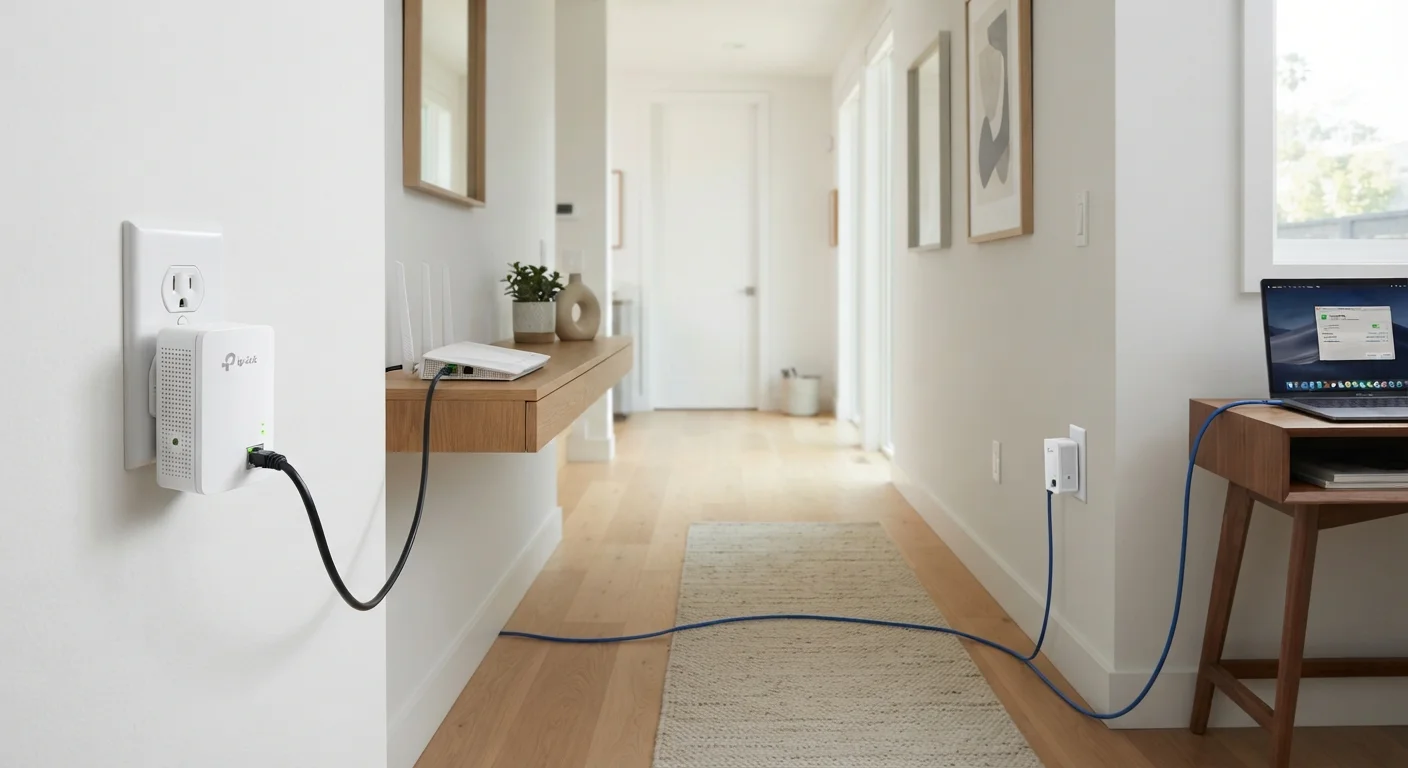
A powerline adapter converts network data into a signal that travels over your home's electrical wiring. You plug one adapter into a wall outlet near your router and connect it via Ethernet, then plug a second adapter into any outlet in the room you want to reach. The two units communicate through the electrical circuit, and you connect your device to the second adapter with another Ethernet cable.
Setup takes about five minutes. Most kits pair automatically, and some include a pass-through outlet so you do not lose the socket.
The practical ceiling for powerline speed varies depending on the age and condition of your electrical wiring, how many circuits your home has, and whether the two adapters end up on the same circuit leg. Older wiring and circuit breakers shared between the two adapters can reduce throughput noticeably. Interference from appliances such as power strips with surge protectors can also reduce performance, which is why most manufacturers recommend plugging adapters directly into wall outlets rather than power strips.
Test before you commit
Before buying a full powerline kit, check whether your two target outlets are on the same electrical circuit. Outlets on the same circuit generally produce better results. A quick way to check: if a circuit breaker controls both outlets, they are on the same circuit. If they are on separate breakers, performance may be reduced.
How MoCA adapters work
MoCA adapters use the coaxial cable in your home, the same type of cable that connects a cable TV box or satellite receiver. One adapter connects to your router and to a coax port; a second adapter at the other end of that coax run delivers an Ethernet connection to your device.
Coaxial cable was designed to carry high-frequency signals with minimal interference, which is why MoCA consistently outperforms powerline on latency and sustained throughput. MoCA 2.5, the current common standard, supports speeds up to 2.5 Gbps in ideal conditions, though real-world performance depends on cable quality and splitter configuration.
One setup consideration: if your coax network connects to an outside cable provider, a MoCA point-of-entry filter should be installed at the point where the cable enters the house. This filter prevents MoCA signals from leaking onto the provider's network. Many internet service providers will install one on request, or you can ask a technician to confirm one is already in place.
| Powerline | MoCA | |
|---|---|---|
| Required existing wiring | Electrical (standard in all homes) | Coaxial cable (common in cable-served homes) |
| Typical real-world speed | Up to 600-1000 Mbps (varies by wiring age) | Up to 1-2.5 Gbps on MoCA 2.5 |
| Latency | Higher, can vary | Lower, more consistent |
| Setup complexity | Plug in and connect Ethernet | Plug in, connect Ethernet, verify POE filter |
| Interference sensitivity | Surge protectors, older wiring, appliances | Splitter count, cable condition |
| Works without cable infrastructure | Yes | No |
Choosing between the two
The decision comes down to what wiring you have and what you need from the connection. Mesh systems handle whole-home coverage differently, but for extending a single wired connection to a specific room, both powerline and MoCA are more direct solutions than adding wireless hardware.
If your home has coaxial cable that reaches the room you need to connect, MoCA is worth considering first. The technology produces lower latency, which matters for video calls and online gaming, and throughput holds up better over longer cable runs.
If coaxial cable is not available at both ends of the run, or if you rent and cannot make changes to existing infrastructure, powerline adapters are the practical choice. They work in any home with standard outlets, and entry-level kits are widely available. Performance will be adequate for general browsing, video streaming, and remote work on a typical broadband connection, though very demanding applications may see occasional variation.
Both technologies avoid the disruption and cost of running new Ethernet. For most households, either one produces a noticeably more stable connection than relying on Wi-Fi alone.